Login and Sign-up
Welcome to SPORTSHUB! Creating your account is quick and simple - all you need is an email address to get started.
One Account, All Features
SPORTSHUB uses a unified account system. Whether you’re a player or organiser, you’ll have one account that lets you:
✅ Book events as a player
✅ Create and manage events as an organiser
Creating Your Account
Step 1: Sign Up

- Visit SPORTSHUB
- Click the “Register” button on the homepage
- Or click “Login” and then select “Register Here” from the login page
Step 2: Fill Out the Registration Form
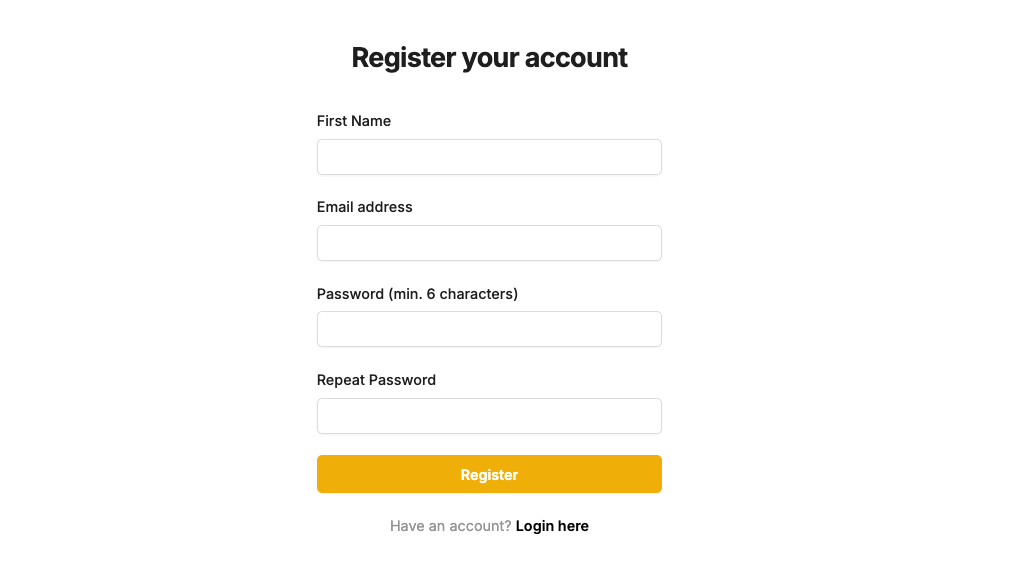 Required information:
- First name (this will be your SPORTSHUB username)
- Email address (this will be your login username)
- Password (choose something secure)
Step 3: Email Verification
- After submitting the form, you’ll receive a verification email
- Check your inbox for the verification link
- ⚠️ Important: Check your spam and junk folders if you don’t see the email
- Click the verification link to activate your account
Step 4: Account Ready!
Once verified, your SPORTSHUB account is ready to use. You can now:
- Browse and book events as a player
- Create and manage events as an organiser
Logging In
Returning Users
- Click the “Login” button on any SPORTSHUB page
- Enter your email address and password
- Click “Sign In” to access your account
Managing Your Profile
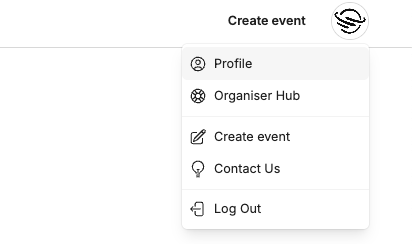
Once logged in, you can customize your profile via profile settings.
Tip
If your display photo isn’t updating try close and reopen your browser completely or try a different browser.
Need Help?
- Email not received? Check spam/junk folders and wait a few minutes
- Login issues? Verify your email and password are correct
- Profile problems? Try the browser troubleshooting steps above
- Still stuck? Contact our support team
Ready to join the SPORTSHUB community? Sign up now →